
Accounting integration
Curcle and QuickBooks Online: the work in one place, the ledger in the other.
Connect your own QuickBooks Online company. Issued invoices and credit notes go across from Curcle; payment status comes back when you reconcile. Jobs, evidence and certificates stay in Curcle.
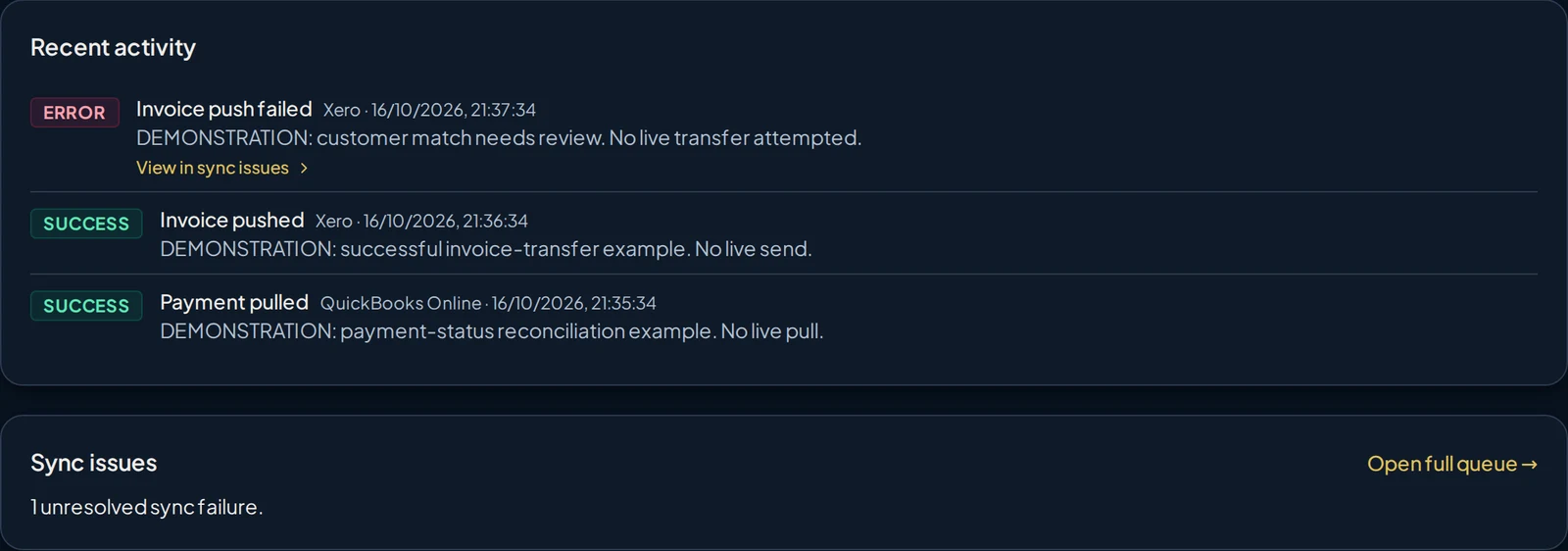

What moves, and when
Clear direction, not a blanket two-way sync
Each company connects its own QuickBooks Online company through a secure sign-in with QuickBooks Online. Here is what that connection does.
- Curcle to your ledger
Issued invoices and credit notes
Issued invoices go across with their invoice number, dates, line descriptions, quantities and unit prices. Customers are matched or created from their name and email. Credit notes are supported too; account and tax settings depend on the provider.
- Your ledger to Curcle
Payment status
For invoices Curcle has already transferred, payment status comes back when someone presses Reconcile now, or on a schedule if scheduled reconciliation is enabled. It is not instant.
- Stays in Curcle
The operational record
Jobs, engineer work, evidence and certificates stay in Curcle. Your accounting system remains the financial ledger.
Avoiding repeat pushes
When an invoice already carries a QuickBooks reference from an earlier push, Curcle reuses it rather than sending the already-recorded invoice again. Treat this as a safeguard, not a guarantee against every possible duplicate.
Confirmed during setup
This is QuickBooks Online only; QuickBooks Desktop is not supported. Your QuickBooks edition, region, income accounts and VAT codes are confirmed with you during setup.
- Account and VAT code mapping
- Contact matching for existing customers
- Whether scheduled reconciliation is enabled
Questions buyers ask about QuickBooks Online
- Which invoices are sent?
- Issued, eligible invoices, not drafts. Curcle checks that an invoice has a non-draft number before sending it. Your own approval process still decides what gets issued, so agree that step during setup.
- How are customers matched to contacts?
- Curcle reuses a contact mapping it already holds. Otherwise it looks for an exact name match. If more than one contact shares the name, Curcle asks you to choose the right one rather than guessing.
- What about VAT?
- Xero uses configured sales-account and standard-rated or zero-rated tax codes. QuickBooks Online uses a configured item and tax-calculation setting; check its company VAT setup with your accountant before use. The two connections do not use identical tax mappings.
- What happens if access expires?
- Curcle attempts to refresh expired access automatically. If that refresh does not succeed, an administrator needs to reconnect the account before transfers can continue.
- What if a push fails?
- The sync activity and issues queue shows what needs attention, with a retry action and a way to fix contact mappings. Keep an eye on it; it is a working tool, not a promise that every failure resolves itself.
- Is this a full two-way sync?
- No. Invoices and credit notes go out; payment status comes back for invoices already transferred. Edits made directly in your ledger are not copied back into Curcle.
QuickBooks Online is a trademark of its owner. Names and logos identify the supported connection; no partnership or certification is implied.

See Curcle with QuickBooks Online in context
Walk through issued invoices, reconciliation and the sync activity queue in a demo, or start a trial and explore at your own pace.